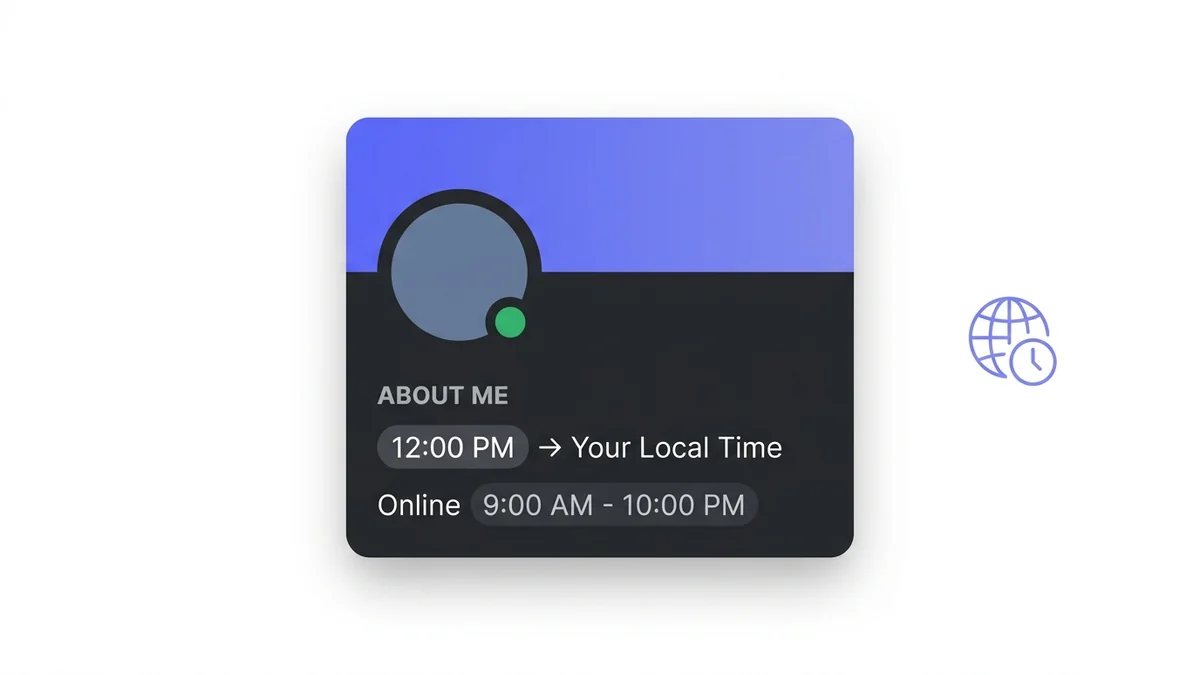
What Is a Discord Bio Timezone Card?
A Discord bio timezone card is a compact snippet inside your Discord About Me profile that uses the native Short Time timestamp flag (<t:UNIX:t>) to show every profile visitor your local time offset automatically. Instead of typing static abbreviations like EST, BST, or AEST and expecting friends or clients to search Google for the hour difference, you paste one self-converting line such as:
12:00 PM for me is <t:1795579200:t> for you!
When someone opens your profile card, Discord hides the underlying calendar date completely and translates <t:1795579200:t> into their personal local clock and 12-hour or 24-hour preference. Someone in the same city sees 12:00 PM for me is 12:00 PM for you!, a teammate across the Atlantic sees 5:00 PM, and a friend in Tokyo sees 2:00 AM. Because Discord's desktop @time helper does not function inside the About Me settings box, a dedicated Discord bio timezone generator is the fastest way to build, preview, and verify these tags.
How to Add a Discord Bio Timezone Card in 4 Steps
Creating a clean, non-truncated Discord bio timezone card takes under ten seconds on desktop or mobile.
1. Select Your Local IANA Time Zone
Pick your real geographical region (such as America/New_York, Europe/London, Europe/Berlin, Asia/Tokyo, or Australia/Sydney) from the 400+ IANA dropdown in the Bio Timezone Card panel above. Selecting a geographical zone ensures today's exact seasonal offset is encoded cleanly into the anchor timestamp.
2. Choose One of 5 Bio Templates and 12h or 24h Labels
Switch between Classic Offset, Online Hours, 2-Line Combo, Midnight and Noon, or Birthday Countdown. European, UK, and international users can tap the 12h Labels button in the panel corner to flip the static anchor text to clean 24-hour notation (12:00 or 09:00 - 22:00).
3. Edit Your Bio Copy and Watch the 190-Character Counter
Customize the wording, swap icons, or add extra profile lines directly inside the Editable Bio Markdown box. Both the dark-mode About Me profile mockup and the exact raw character meter (X / 190 raw chars) update on every keystroke so your Discord bio timezone never breaks mid-tag when saved.
4. Paste and Save Inside Discord About Me
Click Copy Discord Bio Code. On desktop or web, open User Settings -> Profiles -> User Profile -> About Me, paste the code, and click Save Changes. On iOS or Android, tap your bottom Profile tab, choose Edit Profile -> About Me, paste, and tap Save.
Discord Bio Timezone Generator Features
Generic timestamp pages make you calculate anchor timestamps manually and guess whether your About Me bio exceeds Discord's hidden character cap. This Discord bio timezone workspace solves every profile-specific constraint.
Five Purpose-Built Discord Bio Timezone Templates
Jump straight into the five layouts communities actually paste into About Me profiles without typing <t:...> syntax by hand:
- Classic Offset (~45 raw chars):
12:00 PM for me is <t:UNIX:t> for you! - Online / Active Hours (~63 raw chars):
Usually online <t:START:t> - <t:END:t> (your local time) - 2-Line Combo (~108 raw chars): Combines your Classic Offset anchor and your daily Online Hours window cleanly on two lines.
- Midnight and Noon Dual Anchor (~68 raw chars):
My midnight is your <t:MID:t> | My noon is your <t:NOON:t>, eliminating AM/PM confusion for 24-hour readers. - Birthday or Milestone Countdown (~54 raw chars): Pairs
<t:DATE:D>with a live ticking<t:DATE:R>countdown (see more styles on our Discord Birthday Countdown page).
Exact 190-Character Raw Markdown Quota Meter
A tag like <t:1795579200:t> looks like seven rendered characters (5:00 PM), yet Discord counts all 16 raw characters against the 190-character About Me cap. Using two tags for an active-hours window consumes 32 raw characters before emojis or links. Our meter measures exact raw length and turns amber if your custom bio crosses 190 characters.
Live Editable Dark-Mode Profile Preview
Rather than forcing a rigid read-only template, you can type directly inside the Markdown textarea to blend your Discord bio timezone card with pronouns, commission status, or portfolio links while seeing every <t:...> tag render live.
Instant 12-Hour and 24-Hour Anchor Switching
Toggle 12h Labels and 24h Labels in one click so the static half of your bio ("12:00 for me is...") matches your preferred regional clock format seamlessly.
DST-Safe Geographical Zone Selection
Every anchor timestamp is generated with accurate local IANA rules so you never accidentally publish an offset that is one hour off during summer or winter months.
Discord Bio Timezone Use Cases
Freelance Artists and Commission Sellers
Illustrators, 3D modelers, editors, and bot developers who take Discord DM commissions put an Online Hours timezone card in their About Me so international clients immediately know when replies are fastest without waking them at 3:00 AM.
Server Moderators and Support Staff
Community helpers across NA, EU, and APAC display active moderation shifts (<t:START:t> - <t:END:t>) inside their server profiles so members ping whichever moderator is currently awake.
International Gaming Friends and Guilds
Players who team up across continents pin a Classic Offset profile line so squadmates can glance at their profile and calculate raid or duo availability in two seconds.
Streamers and Community Creators
Hosts and VTubers pair a timezone anchor with a live :R countdown for their next debut, subathon, or community movie night.
Study Groups and Distributed Teams
Accountability partners and remote contributors use Midnight and Noon dual anchors to coordinate coworking calls cleanly across North America, Europe, and Asia-Pacific.
Who Uses a Discord Bio Timezone Card?
Discord Power Users and Cross-Region Friend Groups
Anyone with friends in two or more continents adds a compact Discord bio timezone snippet to stop answering "wait, what time is it for you right now?" every week.
Creators, Commission Artists, and Independent Sellers
Solo creators who manage orders through Discord DMs use active-hours bio tags to set clear response expectations automatically in every buyer's local clock.
Community Moderators and Guild Officers
Staff rosters standardize their About Me profiles with matching active-hour windows so members always see coverage gaps in local time.
Nitro Users With Per-Server Profiles
Members who run different roles across work, art, and gaming servers customize separate per-server Discord bio timezone cards tailored to each community.
Why Choose Our Discord Bio Timezone Builder?
Legacy generators like r.3v.fi or basic epoch sites give you raw <t:...> codes with no About Me mockup, no active-hours dual-tag builder, no 12h/24h text switch, and no 190-character raw length meter. Our Discord bio timezone card maker puts editable preview, 5 proven layouts, 400+ IANA zones, and exact character counting in one ad-free view.
Tips for Keeping Your Discord Bio Timezone Accurate
- Always use
:t(Short Time) for daily offset cards: Using:for:Fprints a specific calendar date that quickly looks outdated a week later. Short Time (:t) shows only hours and minutes cleanly every day. - Refresh twice a year if you cross DST boundaries: If you live in the US or Europe and frequently chat with regions that do not observe DST (such as Japan, Singapore, or Arizona), regenerate your Discord bio timezone anchor once in March and once in November.
- Keep Custom Status plain: Remember that
<t:...>works inside About Me bios and chat messages, not inside Discord Custom Status bubbles. - Check mobile line breaks: On narrow phones, keep your Discord bio timezone line under ~48 rendered characters so it stays on a single tidy line. For phone pasting tips, visit our Mobile Copy-Paste Guide.
