What Is the Discord @time Command?
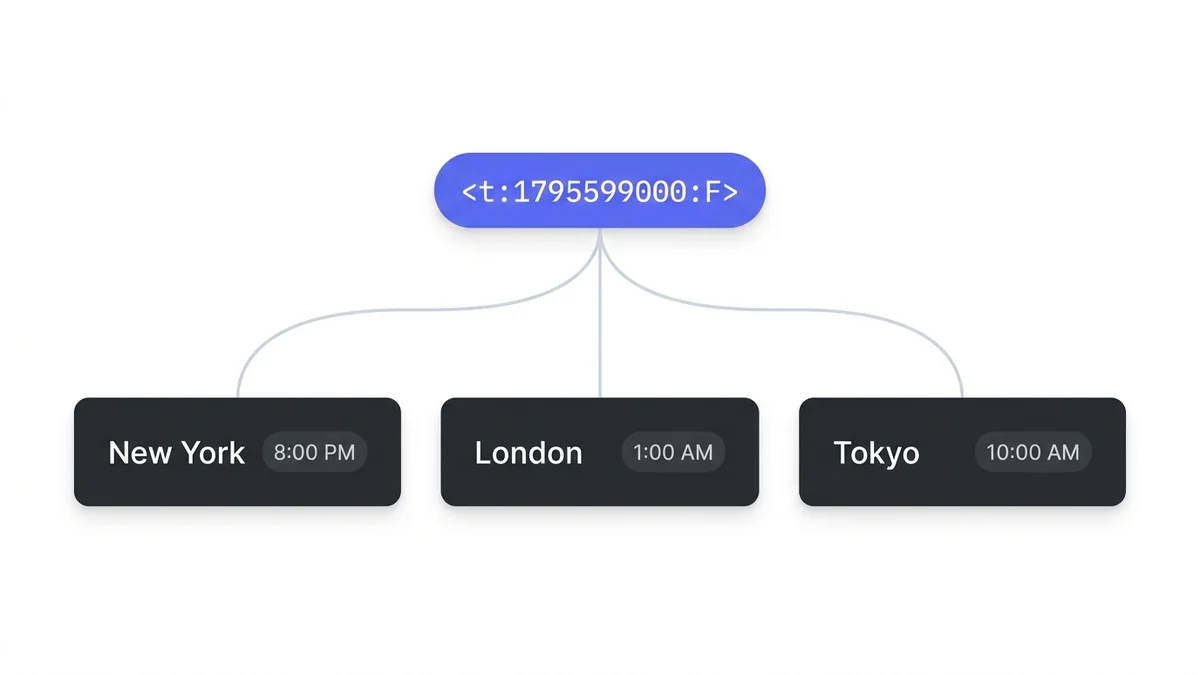
Discord @time is Discord's built-in inline timestamp helper for desktop chat composers. Typing @time inside a regular desktop text channel opens a quick popup selector that inserts a native <t:UNIX_SECONDS:FORMAT> code based on your computer's local system timezone.
Because Discord @time outputs the exact same official <t:UNIX:FORMAT> syntax as any web generator, there is zero visual difference once your message lands in chat. The real question for server admins, moderators, creators, and developers is practical: when is the native picker fast enough, and where does a dedicated web studio like discordtimestamp.im save significant time?
How to Pick the Right Workflow Between Discord @time and a Web Generator
1. Use Discord @time for Fast Single-Zone Desktop Pings
If you are already sitting at a desktop PC, scheduling one casual meetup in your own local timezone, and typing directly inside a regular channel message, Discord @time handles that quick one-off tag without leaving the app.
2. Switch to a Web Converter Whenever Another Timezone Is Involved
Whenever a European moderator translates a 10:00 AM PST game patch, or an East Coast host confirms a Saturday night Tokyo rollover, an IANA selector keeps Daylight Saving math exact. Open our Discord Time Zone Converter instead.
3. Use Specialized Tabs for Bios, Schedules, Embeds, and Decoders
If your message belongs in an About Me profile bio, spans a 6-stage tournament schedule, requires Discohook Webhook JSON, or fixes a broken millisecond tag, jump straight into the matching tab on our All Tools Directory.
4. Verify Global Rollovers Before Pinging @everyone
Before pinging thousands of members, check the 6-city world strip or send a Share URL verification link to a co-moderator so every region lands on the right day.
Side-by-Side Comparison: Discord @time vs. Web Studio
| Capability | Built-In Discord @time | discordtimestamp.im Studio |
|---|---|---|
| Quick single local tag in desktop chat | Supported | Supported (natural language + all 9 formats) |
| 1. Discord About Me Bio Timezone Cards | Chat boxes only | Bio Timezone Card + 190-char raw meter |
| 2. 400+ Foreign IANA Timezone Conversion | Local clock only | DST-safe Time Zone Converter + 6-city strip |
3. One-Click Combo Tag (:F + :R) |
Insert twice | 1-click COMBO button at top of list |
| 4. Multi-Line Event Schedules (up to 10 rows) | Insert one by one | Batch Event Schedule Builder in 1 copy |
| 5. Webhook Embed ISO 8601 JSON | Chat Markdown only | Embed Timestamp JSON + decimal color |
| 6. Snowflake Decoding and 7-in-1 Syntax Repair | Creation only | Snowflake Decoder + Syntax Fixer |
| 7. Mobile iOS / Android Speed + PWA | Desktop-first | Single-thumb Mobile PWA Guide |
| 8. Co-Host Shareable Preview Links | Local draft only | Direct ?t=UNIX&tz=IANA Share URL |
Web Studio Features That Complement Discord @time
Full 400+ Geographical IANA Zones With DST Alerts
Pick any global region from New York to Tokyo or Sydney while getting inline warnings on skipped Daylight Saving hours.
One-Click Combo Format (:F + :R)
Copy both full localized weekday/hour and a live ticking countdown together so mobile members read exact times immediately.
Dedicated Bio, Multi-Line Schedule, and Webhook Embed Tabs
Build 190-character About Me cards, 10-line tournament announcements, and valid ISO 8601 Webhook payloads in one workspace.
Integrated Snowflake Decoder and 7-in-1 Syntax Fixer
Inspect 18-digit Discord IDs with BigInt precision and automatically repair 13-digit millisecond or lowercase :r mistakes.
6 Real Use Cases Where a Web Generator Outperforms the Native Picker
About Me Profile Bio Timezone Cards
Inside User Settings -> Profiles -> About Me, pasting a tested "12:00 PM for me is <t:UNIX:t> for you!" line or Birthday Countdown with live 190-character metering ensures your bio saves cleanly.
Cross-Timezone Game Patch and Stream Announcements
Translating a 10:00 AM PST Steam release or 21:00 JST VTuber premiere from another continent requires an IANA source-timezone selector so Daylight Saving shifts stay accurate.
Multi-Stage Esports Brackets and Community Schedules
Batching Check-in, Qualifiers, Semifinals, and Finals in one unified schedule builder saves minutes and guarantees uniform formatting across every stage.
Bot Embeds, Discohook Panels, and Automation Webhooks
Discord Webhooks, Zapier, Make, and n8n expect strict ISO 8601 UTC footer strings (2026-11-25T12:00:00.000Z) and base-10 accent colors alongside dynamic description tags.
Moderation Audits, Snowflake IDs, and Broken Tag Repair
Staff inspecting an 18-digit User ID's exact creation millisecond or repairing a bot's 13-digit millisecond <t:...> message need a local decoder and syntax fixer.
Mobile-First Server Administration
Admins coordinating raids or giveaways from iPhone or Android rely on natural-language shortcuts (in 45m, tomorrow 8pm EST) and one-tap copy buttons.
Who Uses Discord @time Alongside a Web Generator?
International Community Admins and Moderators
Moderators managing multi-continent communities use Discord @time for casual chats and bookmark discordtimestamp.im for official #announcements and cross-timezone events.
Streamers, Guild Officers, and Tournament Hosts
Hosts publishing multi-line weekly schedules, live countdown combos, and profile bio cards save substantial time every week with specialized studio tools.
Bot Developers and Webhook Builders
Engineers rely on raw 10-digit Unix integers, ISO 8601 strings, and BigInt Snowflake decoders when building automated bots and status panels.
Why Choose Our Studio Alongside Discord @time?
For a quick one-off ping in your own timezone on desktop, Discord @time is genuinely convenient. Our studio covers every advanced workflow around it: all 9 formats including compact :s and :S, natural-language parsing, 400+ DST-safe IANA zones, live 6-city simulation, About Me bio cards, 10-line schedules, Webhook JSON, and instant 7-in-1 syntax repair, all 100% client-side and ad-free.
Quick Tips for Combining Both Workflows Smoothly
- Both produce identical
<t:...>syntax: Mix a quick Discord @time tag and a studio-generated Combo tag inside the same server with 100% visual consistency. - Pair
:Fwith:Rfor global events: Adding a live countdown beside the full date makes mobile announcements dramatically clearer. - Compare other web tools too: See how we stack up against legacy web generators in our HammerTime Discord Alternative comparison.
