What Developers Need to Know About Discord Timestamp Code
Building a reliable Discord timestamp in bot code or webhook automations comes down to three strict engineering rules: message-body tags (<t:UNIX:FLAG>) require 10-digit integer Unix seconds (never 13-digit milliseconds and never float decimals), embed footer clocks (embed.timestamp) require strict ISO 8601 UTC strings, and Discord Snowflake IDs must be parsed as 64-bit integers (BigInt in JavaScript) to avoid IEEE-754 precision loss.
Every snippet below is zero-bloat, tested against Discord's live parser, and ready to drop into Discord.js v14, Discord.py 2.x, vanilla TypeScript, Python 3, Go, or raw Webhook HTTP requests.
How to Format a Discord Timestamp Safely in 4 Steps
1. Always Normalize Dates to Integer UTC Unix Seconds
Convert your date object in UTC first, then floor to whole seconds (Math.floor(ms / 1000) in JS, int(dt.timestamp()) in Python, t.Unix() in Go). Never rely on a host container's local timezone for wall-clock math.
2. Choose an Explicit Case-Sensitive Format Flag
Pass one of Discord's nine official flags (t, T, d, D, f, F, s, S, or uppercase R) rather than assuming defaults, and validate that relative cooldowns always use uppercase R.
3. Keep Dynamic Tags Inside Supported Embed Fields
Place <t:UNIX:FLAG> tags inside content, embeds[].description, or embeds[].fields[].value. Never place Markdown timestamps inside embed.title, fields[].name, or footer.text.
4. Use Strict ISO 8601 UTC Strings for embed.timestamp
Pass a UTC ISO string ending in Z (2026-11-25T12:00:00.000Z) to embed.timestamp and convert hex colors to base-10 integers so Discord never rejects your webhook with HTTP 400 Bad Request.
Core Code Features Covered Across Major Bot Languages
Vanilla JavaScript and TypeScript Helper (Zero Dependencies)
Always divide JavaScript milliseconds by 1000 and apply Math.floor() before constructing a Discord timestamp string:
/**
 * Format any Date, Unix ms number, or ISO string as a Discord timestamp tag.
 * Valid styles: "t" | "T" | "d" | "D" | "f" | "F" | "s" | "S" | "R"
 */
export function discordTimestamp(date = new Date(), style = "F") {
  const unixSeconds = Math.floor(new Date(date).getTime() / 1000);
  return "<t:" + unixSeconds + ":" + style + ">";
}

// Examples:
const cooldownTag = discordTimestamp(Date.now() + 60_000, "R");
const launchTag = discordTimestamp("2026-12-31T23:59:00Z", "F");
Discord.js v14 Official Built-In Formatter
Discord.js v14 exports typed helpers from @discordjs/formatters so you avoid manual integer math and typos when assembling a Discord timestamp inside slash commands and embeds:
import { time, TimestampStyles, EmbedBuilder } from "discord.js";

const launchDate = new Date("2026-12-01T18:00:00Z");
const fullTag = time(launchDate, TimestampStyles.LongDateTime);
const relTag = time(launchDate, TimestampStyles.RelativeTime);

const embed = new EmbedBuilder()
  .setTitle("Season Launch")
  .setDescription("Starts " + fullTag + " (" + relTag + ")")
  .setColor(0x5865f2)
  .setTimestamp(launchDate); // Serialized to ISO 8601 UTC automatically
Python 3 and Discord.py 2.x (Timezone-Aware UTC)
Always pass tzinfo=timezone.utc when building Python datetime objects so deploying from a local workstation to a cloud Linux container never shifts your Discord timestamp output:
from datetime import datetime, timezone
import discord

dt = datetime(2026, 12, 1, 18, 0, tzinfo=timezone.utc)

# Pure Python (zero external deps, strict integer seconds):
unix_sec = int(dt.timestamp())
tag_combo = "<t:%d:F> (<t:%d:R>)" % (unix_sec, unix_sec)

# Discord.py 2.x official helper:
tag_dpy = discord.utils.format_dt(dt, "F") + " (" + discord.utils.format_dt(dt, "R") + ")"

# Strict Webhook / Embed footer ISO 8601 UTC string:
iso_footer = dt.isoformat().replace("+00:00", "Z")
Decoding Discord Snowflake IDs in JavaScript (BigInt) and Python
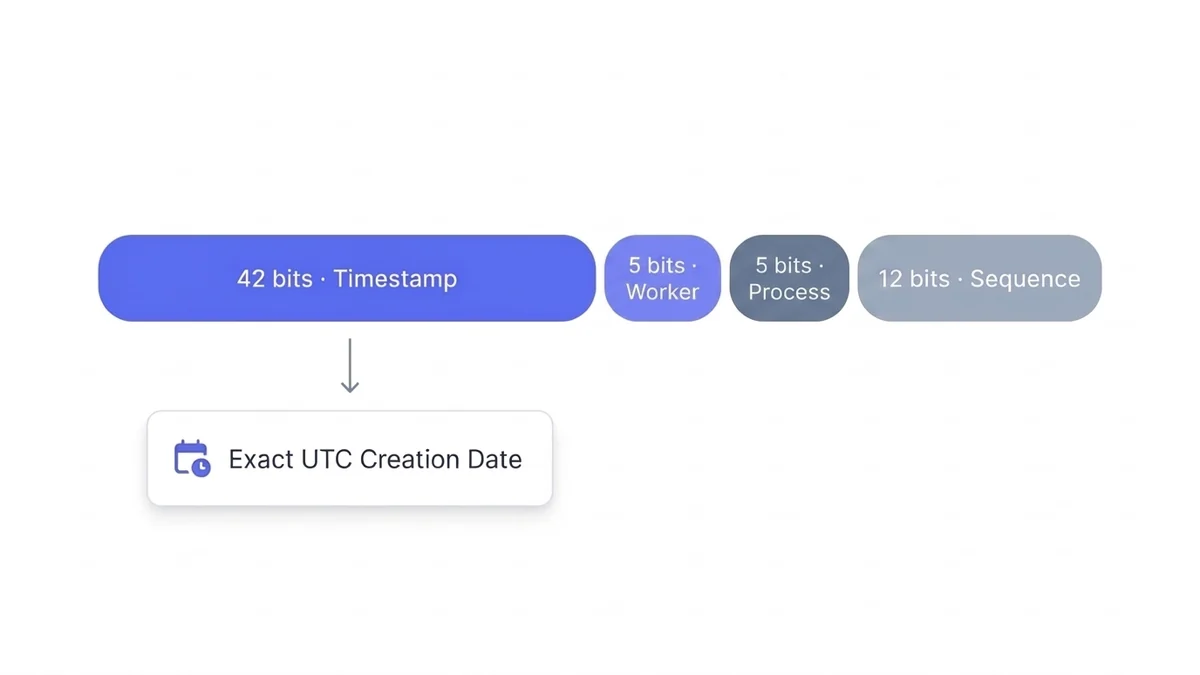
Discord's custom Snowflake epoch is 1420070400000 (2015-01-01T00:00:00.000Z). Shift right by 22 bits to extract exact creation milliseconds and divide by 1000 for a Discord timestamp:
// JavaScript: ALWAYS pass Snowflake ID as a string to preserve 64-bit precision!
const DISCORD_EPOCH = 1420070400000n;
export function snowflakeToUnixSeconds(idStr) {
  const unixMs = Number((BigInt(idStr) >> 22n) + DISCORD_EPOCH);
  return Math.floor(unixMs / 1000);
}
# Python supports arbitrary-precision integers natively:
DISCORD_EPOCH_MS = 1420070400000

def snowflake_to_datetime(snowflake_id: str | int) -> datetime:
    unix_ms = (int(snowflake_id) >> 22) + DISCORD_EPOCH_MS
    return datetime.fromtimestamp(unix_ms / 1000, tz=timezone.utc)
Go (Golang) Bot Helper
Go's time.Time.Unix() returns a 64-bit integer in seconds natively, making Discord timestamp formatting completely concise:
package main

import (
    "fmt"
    "time"
)

func DiscordTimestamp(t time.Time, style string) string {
    return fmt.Sprintf("<t:%d:%s>", t.Unix(), style)
}
Developer Use Cases for Programmatic Discord Timestamps
Command Cooldowns and Rate-Limit Notices
Return "Slow down! You can run this command again <t:UNIX:R>." using now + cooldownSeconds so users watch their own lockout tick to zero live.
Automated CI/CD, GitHub Actions, and Release Webhooks
Format build completion timestamps in both embed.timestamp (ISO 8601) and embed.description (<t:UNIX:F> (<t:UNIX:R>)) so distributed engineering teams read deploys in local time.
Moderation Logs and Account-Age Filters
Extract exact user creation dates from incoming joiner Snowflake IDs using BigInt bit-shifting and flag accounts newer than 24 hours with clickable <t:UNIX:R> badges in #mod-logs.
Scheduled Reminders and Cron-Driven Server Events
Store a single integer UTC Unix second per scheduled event in PostgreSQL, SQLite, or Cloudflare D1, then render it dynamically in any of the 9 official Discord Timestamp Formats at send time.
Who Uses These Discord Timestamp Code Snippets?
Discord.js and Discord.py Bot Authors
Bot maintainers building economy cooldowns, giveaway engines, moderation suites, and raid schedulers copy these tested helpers to avoid millisecond and naive-datetime bugs.
DevOps and Webhook Integrators
Engineers wiring GitHub Actions, Stripe alerts, Sentry errors, and uptime monitors into Discord webhooks pair our code with the Embed Timestamp JSON validator.
Full-Stack Web and No-Code Automation Builders
Developers running Zapier, Make, n8n, or Cloudflare Workers scripts verify exact integer second math rapidly before pushing to production.
Why Choose This Developer Reference?
Short forum snippets often miss Math.floor(), omit tzinfo=timezone.utc in Python, ignore BigInt precision loss on 18-digit Snowflake IDs, or skip Discord's compact :s and :S styles. Every helper on this page handles those real production traps cleanly, runs with zero heavy dependencies, and links straight to browser-local verification tools so you can test every epoch and webhook payload before shipping.
Common Production Bugs to Catch Before Deploying
- 13-digit milliseconds in
<t:...>: Always divide JSDate.now()by1000and floor; otherwise Discord prints year+58865. Test numbers in our Discord Unix Converter. - Float decimals from Python
time.time(): Wrap inint(...)so no decimal point ever enters the tag. - Unquoted Snowflakes in JSON payloads: Always deserialize Discord IDs as strings before passing them to
BigInt(id)(verify live on our Snowflake ID Decoder). - Broken live output in staging: Drop any failing bot message straight into our Timestamp Syntax Fixer for instant diagnostics.
