What Is a Discord Timestamp Decoder?
A Discord timestamp decoder is a local browser utility that translates raw <t:UNIX:FORMAT> Markdown tags back into human-readable local dates, exact UTC ISO 8601 strings, and relative countdowns. Whenever you copy an announcement out of Discord into Notion, Google Docs, Slack, GitHub Issues, or a bot JSON config, Discord's visual date chips revert to unreadable integers like <t:1795579200:F> and <t:1795575600:R>.
Instead of manually copying each 10-digit number one by one into a generic epoch converter, drop the entire message straight into this Discord timestamp decoder. It scans the whole paragraph in milliseconds, unpacks every valid tag side by side, decodes any embedded Snowflake IDs, and repairs broken syntax automatically.
How to Use the Discord Timestamp Decoder in 4 Steps
1. Copy Raw <t:...> Code or a Full Copied Discord Message
Grab a single raw tag, a multi-line event schedule copied from Discord, a moderation log export, or a raw Discohook JSON payload.
2. Paste Everything Into the Decoder Textarea
Paste the whole text block directly into the box above (or click Sample Multi-Tag Message to test how bulk extraction works right away). No manual cleanup is required.
3. Read Exact Local Time, UTC ISO 8601, and Style Flags
Each extracted tag appears in its own structured card displaying the detected format flag (:t through :R, or default :f), exact local rendering, strict UTC ISO 8601 (2026-11-25T12:00:00Z), 10-digit Unix seconds, and live relative distance.
4. Repair Broken Tags or Re-Edit in the Main Studio
If any tag in your paste contains a syntax bug (milliseconds, backticks, extra spaces, lowercase :r), click Copy Fixed Message on the yellow diagnostic card. To shift a decoded event by an hour and re-copy all 9 formats, paste the tag into the top quick bar.
Discord Timestamp Decoder Features
Bulk Multi-Tag Extraction (Up to 12 Tags per Paste)
Reads an entire multi-stage tournament announcement or bot template at once, saving minutes of tedious single-epoch copy-pasting.
Side-by-Side Local and Unambiguous UTC ISO 8601 Output
Prints both your local browser clock and universal UTC time so moderators and engineers working across continents verify the exact same reference second.
Combined Snowflake ID + Timestamp Inspection
Moderation logs frequently mix <t:...> dates with 18-digit Discord User or Message IDs. This Discord timestamp decoder recognizes both formats in a single paste (learn more on our Snowflake ID Decoder page).
Built-In 7-in-1 Broken Tag Repair Engine
Automatically spots and repairs 13-digit milliseconds, backticks, colon spaces, full-width brackets, missing angle brackets, lowercase :r, and invalid letters (see our Fix Discord Timestamp Not Working guide).
100% Client-Side Privacy for Private Moderation Logs
Every regex scan and date calculation happens strictly inside your local browser memory with zero network uploads.
What Our Discord Timestamp Decoder Parses Automatically
| Pasted Input Pattern | Example | Decoded Output |
|---|---|---|
| Standard flagged tag | <t:1795579200:F> |
Exact local :F, UTC ISO, Unix seconds, relative delta |
| Flag-less default tag | <t:1795579200> |
Decoded using Discord's default :f Short Date/Time |
| Negative pre-1970 tag | <t:-14159025:D> |
Pre-1970 historical local and UTC date |
| Relative-only tag | <t:1795579200:R> |
Reveals hidden exact calendar date and second |
| 17-20 digit Snowflake ID | 175928847299117063 |
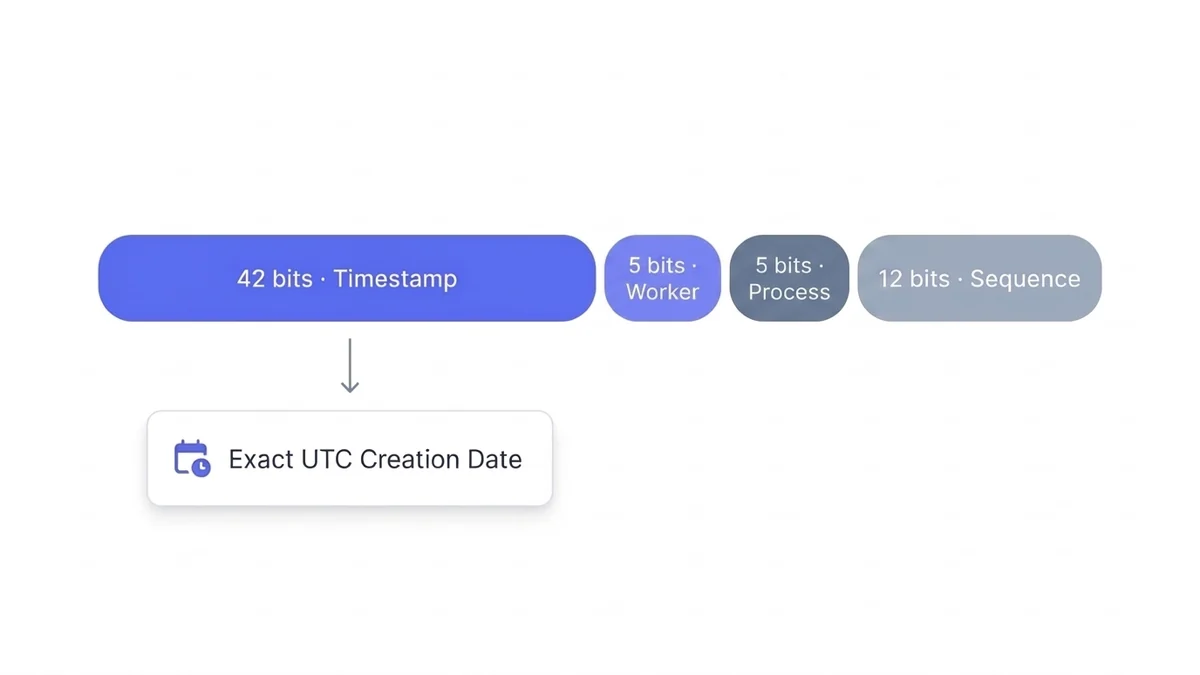
Millisecond UTC creation time + Worker/Process/Increment |
| Broken millisecond / space tag | <t: 1795579200000: r> |
Auto-repaired to <t:1795579200:R> + decoded dates |
Discord Timestamp Decoder Use Cases
Discord Timestamp Decoder for Reviewing Copied Event Announcements
Co-moderators double-check every date inside a draft multi-line announcement pasted into Google Docs or staff channels before publishing to @everyone.
Discord Timestamp Decoder for Auditing Bot Configs and Webhook JSON
Developers inspect raw JSON files, YAML schedules, and GitHub pull requests containing <t:...> integers to verify release times without booting a test bot.
Discord Timestamp Decoder for Archiving Discord Logs Outside Discord
When saving community records, incident reports, or rule histories into Markdown or PDF archives, staff translate raw <t:...> codes back into readable UTC dates.
Discord Timestamp Decoder for Inspecting Hidden :R Relative Dates
Users on mobile who cannot hover over a "in 3 days" relative chip copy the raw message and unpack the exact start minute cleanly here.
Who Uses a Discord Timestamp Decoder?
Server Moderators and Audit Staff
Staff inspecting exported moderation logs, draft schedules, and archived announcements rely on a private local Discord timestamp decoder.
Bot Developers and Automation Engineers
Engineers debugging Discohook payloads, Zapier workflows, and Discord.js templates verify exact encoded epochs before deployment.
Technical Writers and Community Archivers
Wiki editors converting Discord discussions into permanent web documentation translate raw <t:...> strings into human dates rapidly.
Why Choose Our Discord Timestamp Decoder?
Regular epoch sites break if you paste <t:1795579200:F> with brackets attached and only handle one number at a time. Our Discord timestamp decoder parses whole raw Discord messages in bulk, shows UTC and local time together, decodes embedded Snowflakes, repairs broken syntax, and never uploads a single character to any server.
Quick Tips for Decoding Discord Messages
- Copy raw text cleanly: Right-click a message in Discord and click Copy Text (not Copy Message Link) to capture the raw
<t:UNIX:FLAG>Markdown strings. - Check all 6 global cities: After decoding a tag, drop it into the top quick bar and open the Time Zone Converter view to see how that decoded instant lands in New York, London, Berlin, Tokyo, and Sydney.
- Need to convert raw numbers without brackets? Use our two-way Discord Unix Converter.
