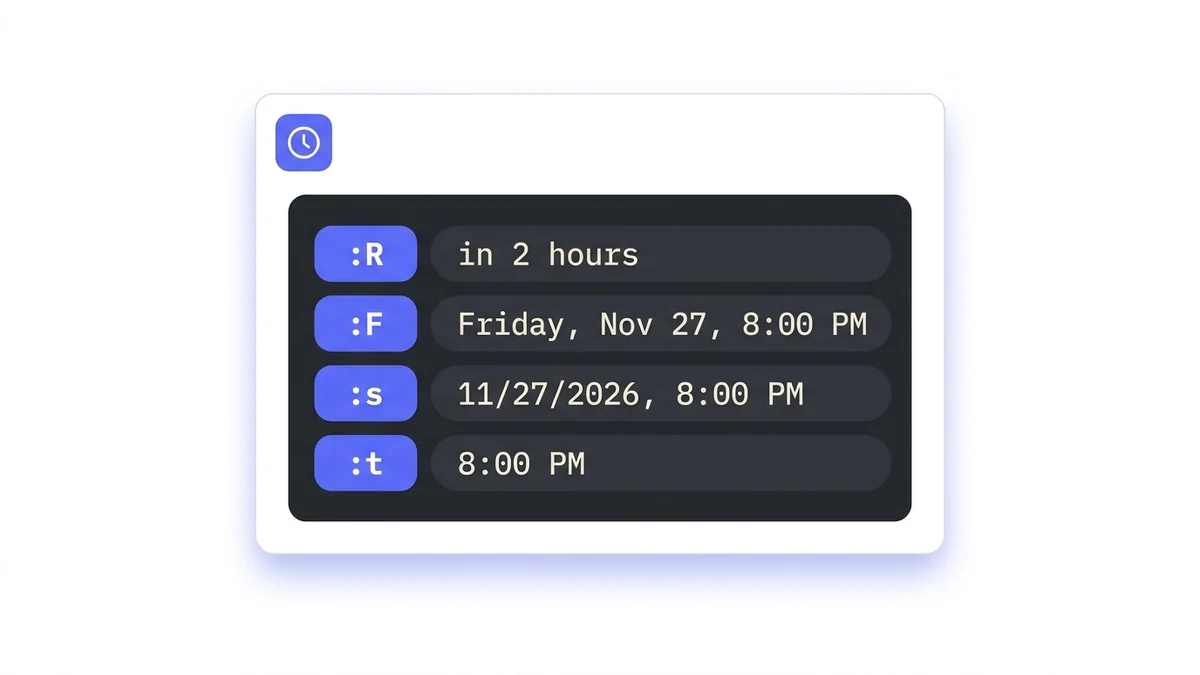
What Are Discord Timestamp Formats?
Discord timestamp formats are the nine single-letter style flags (:t, :T, :d, :D, :f, :F, :s, :S, and :R) placed at the end of a <t:UNIX_SECONDS:FLAG> tag to control how Discord renders a universal Unix timestamp. All nine Discord timestamp formats share the exact same 10-digit UTC integer in the middle; only the final case-sensitive letter changes whether readers see a bare hour (12:00 PM), a compact numeric date (11/25/2026 12:00 PM), a full weekday announcement (Wednesday, November 25, 2026 12:00 PM), or a live ticking countdown (in 3 hours).
Every official Discord timestamp follows one strict syntax template:
<t:UNIX_SECONDS:STYLE_FLAG>
If you omit the second colon and letter (<t:1795579200>), Discord falls back automatically to :f (Short Date and Time). Because every flag is strictly case-sensitive, swapping lowercase and uppercase changes the rendered style, and typing lowercase :r breaks rendering entirely.
How to Pick and Copy Discord Timestamp Formats in 4 Steps
Compare all nine styles live on a real date before pasting into your server.
1. Enter Your Target Date or Natural Phrase
Type tomorrow 8pm EST, in 3h, or pick a calendar date and IANA time zone in the studio above. All nine Discord timestamp formats calculate immediately from that single instant.
2. Toggle 12h / 24h and Global City Previews
Click the 12h button in the quick bar to switch between US 12-hour previews and European 24-hour previews, and tap any of the six global cities to confirm exact day rollovers across continents.
3. Match the Format Flag to Your Channel Density
Pick :t for Discord Bio Timezone Cards, :s or :S for dense tournament tables and audit logs, :F for formal weekday clarity, :R for ticking Countdowns, or the top COMBO row <t:UNIX:F> (<t:UNIX:R>) for maximum clarity on both desktop and mobile.
4. Click Once to Copy Clean Syntax
Click any row to copy the exact <t:UNIX:FLAG> string with zero stray spaces, zero backticks, and verified 10-digit second precision.
Complete Reference Table of All 9 Discord Timestamp Formats
Many legacy sites still document only seven flags and omit Discord's newer compact :s and :S styles. Here is the complete reference across all nine Discord timestamp formats plus the moderator Combo pattern:
| Flag | Style Name | Syntax Example | en-US (12h) Output | en-GB (24h) Output | Best Usage |
|---|---|---|---|---|---|
:t |
Short Time | <t:1795579200:t> |
12:00 PM |
12:00 |
Bio Timezone Cards and same-day pings |
:T |
Long Time | <t:1795579200:T> |
12:00:00 PM |
12:00:00 |
Speedrun splits and second-level sync cues |
:d |
Short Date | <t:1795579200:d> |
11/25/2026 |
25/11/2026 |
Compact rosters and calendar tables |
:D |
Long Date | <t:1795579200:D> |
November 25, 2026 |
25 November 2026 |
Birthday Countdowns and launch dates |
:f |
Short Date/Time (default) | <t:1795579200:f> |
November 25, 2026 12:00 PM |
25 November 2026 12:00 |
Everyday meetings and general chats |
:F |
Long Date/Time | <t:1795579200:F> |
Wednesday, November 25, 2026 12:00 PM |
Wednesday, 25 November 2026 12:00 |
Official server announcements needing weekday |
:s |
Short Numeric Date + Time (new) | <t:1795579200:s> |
11/25/2026 12:00 PM |
25/11/2026 12:00 |
Dense Event Schedules and mobile layouts |
:S |
Short Numeric Date + Secs (new) | <t:1795579200:S> |
11/25/2026 12:00:00 PM |
25/11/2026 12:00:00 |
Moderation logs, drop proofs, and incident reports |
:R |
Relative Time / Countdown | <t:1795579200:R> |
in 3 hours |
in 3 hours |
Live Discord Countdowns and elapsed timers |
| Combo | Full + Relative | <t:1795579200:F> (<t:1795579200:R>) |
Full weekday + (in 3 hours) |
24h full + (in 3 hours) |
Gold standard for global @everyone pings |
Features of Our Interactive Discord Timestamp Formats Studio
Full Support for Newer :s and :S Compact Flags
Every date you test generates compact :s and :S tags alongside the original seven formats, highlighted with a NEW badge so you can spot them immediately.
Live Side-by-Side 12-Hour and 24-Hour Preview
Flip the quick bar from 12h to 24h to inspect how numeric dates and hours appear for European and UK audiences before publishing.
One-Click Combo Tag Assembly
Instead of copying :F and :R separately and typing parentheses manually, click the highlighted COMBO row at the top of the list to grab <t:UNIX:F> (<t:UNIX:R>) ready to paste.
Live Discord Chat Bubble Context
See how each flag looks inside a real dark-mode Discord pill highlight right alongside normal message text so you can pick the cleanest width for mobile screens.
Where Discord Timestamp Formats Render vs. Where They Stay Plain Text
| Discord Surface | Renders <t:UNIX:FLAG>? |
Alternative If Unsupported |
|---|---|---|
| Regular text messages & DMs | Yes | Standard usage |
| Announcement channels & cross-posts | Yes | Preserves dynamic conversion across servers |
| Forum posts, threads & pinned posts | Yes | Standard usage |
| User About Me & per-server bios | Yes | Counts 16 raw chars toward 190-char cap |
| Scheduled Event descriptions | Yes | Great for multi-stage brackets |
Embed description & fields[].value |
Yes | Combine with ISO 8601 embed.timestamp |
Embed timestamp (footer clock) |
No | Use ISO 8601 UTC (Embed Generator) |
Embed title, footer.text, author.name |
No | Plain text only |
| Channel names, nicknames, Custom Status | No | Plain text only |
Inline `code` or triple-backtick blocks |
No | Remove backticks so Discord renders live |
Discord Timestamp Formats Use Cases
Discord Timestamp Formats for International Announcements (:F + :R)
Combining :F and :R guarantees every global reader immediately sees their local weekday, hour, and ticking countdown without hovering on mobile.
Discord Timestamp Formats for Compact Mobile Schedules (:s + :R)
Multi-stage tournament brackets and stream calendars use :s (11/25/2026 8:00 PM) to stay on a single line even on 390px smartphones.
Discord Timestamp Formats for Profile Bios (:t and :D)
Profile timezone cards rely strictly on :t so the calendar date stays hidden, while birthday bios pair :D with :R.
Discord Timestamp Formats for Moderation and Incident Audits (:S and :T)
Staff logs documenting raid waves, scam messages, or bot deploys use :S or :T to retain exact second-level chronological precision.
Who Uses This Discord Timestamp Formats Reference?
Server Moderators and Announcement Writers
Moderators bookmark this cheat sheet to choose the right visual density for dense calendars, mobile pings, and pinned policy notices.
Bot Developers and Webhook Integrators
Engineers verify exact single-letter flags (t, T, d, D, f, F, s, S, R) before hardcoding constants in Discord.js, Discord.py, or Go.
Community Designers and Profile Customizers
Power users designing clean About Me bios and Discohook panels compare rendered widths across all nine Discord timestamp formats before finalizing layouts.
Why Choose Our Discord Timestamp Formats Reference?
Static blog cheat sheets show frozen 2021 examples that omit Discord's compact :s and :S codes and force you to open a second website just to copy a real date. On this page, every one of the nine Discord timestamp formats runs live inside a DST-safe IANA engine with instant 12h and 24h switching, a dark-mode Discord message preview, and zero ads blocking your copy buttons.
Quick Syntax Tips to Prevent Broken Formats
- Remember uppercase
:R::rdoes not exist in Discord's parser. - Check exact letter case for
:svs:Sand:fvs:F: Lowercase is compact/short; uppercase adds seconds or weekday. - Strip backticks before sending: If a pasted format shows raw angle brackets, test it in our Timestamp Syntax Fixer or unpack existing chat logs in our Bulk Message Decoder.
