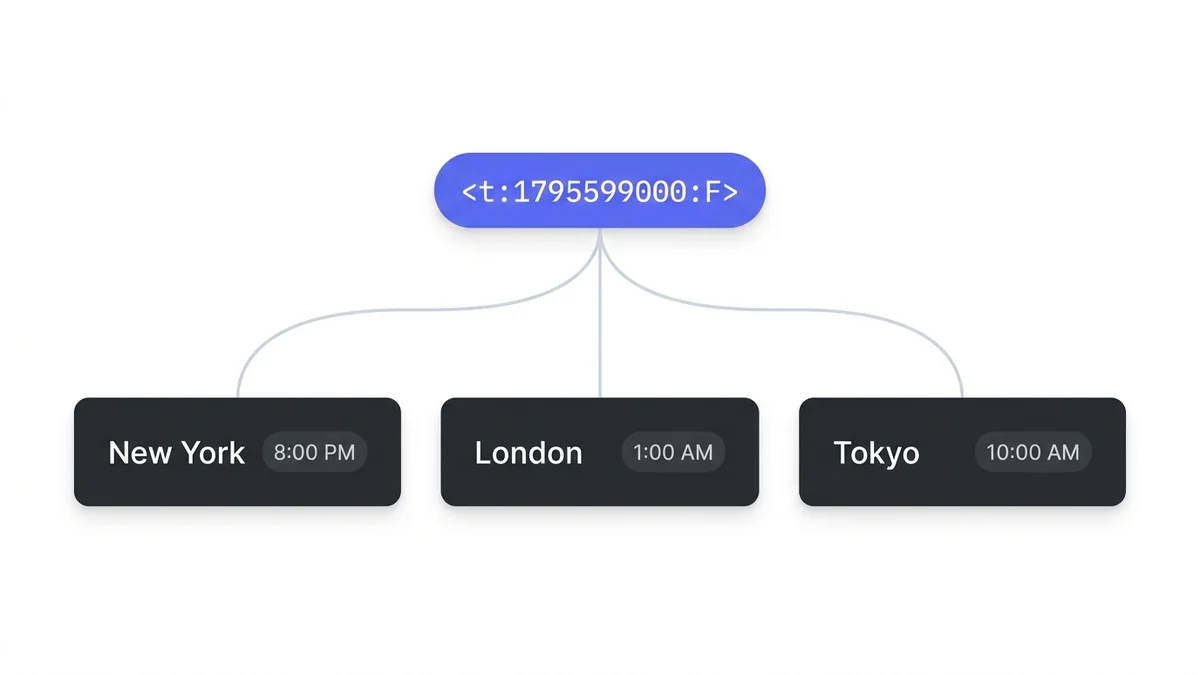
What Is a UTC to Discord Timestamp Converter?
A UTC to Discord timestamp converter translates Coordinated Universal Time (UTC+0) or Greenwich Mean Time (GMT) into a single dynamic Discord tag (<t:UNIX:FORMAT>) that renders automatically in every server member's local timezone. Global MMO servers, gacha game reset trackers, flight-simulator leagues, open-source maintainers, and DevOps teams anchor schedules on UTC because UTC never shifts for Daylight Saving Time.
Yet typing "Maintenance ends at 16:00 UTC" still forces everyday Discord members to stop and search "16:00 UTC in my timezone", and UK admins frequently confuse winter GMT (UTC+0) with summer BST (UTC+1). Using this UTC to Discord timestamp preset turns any universal clock into a readable local chip for every continent in one click.
How to Convert UTC to a Discord Timestamp in 4 Steps
1. Start With Fixed UTC Pre-Locked (or Pick Europe/London for UK BST)
This UTC to Discord timestamp page opens directly on UTC. Leave it on UTC for global game resets, aviation logs, and bot maintenance, or switch to Europe/London when coordinating UK local meetups that follow British Summer Time (BST).
2. Enter Your UTC Date and 24-Hour Time
Pick your calendar date and clock hour below, or type quick phrases like tomorrow 18:00 UTC or friday 00:00 UTC into the smart bar. Click 12h to preview 24-hour rendering and MM/DD to flip to UK DD/MM numeric parsing.
3. Inspect the 6-City World Strip for Previous-Day NA Rollovers
Check New York, Los Angeles, London, Berlin, Tokyo, and Sydney right below the preview. Note that early-morning UTC slots like 00:00 UTC or 02:00 UTC actually happen on the previous evening in North America, so verifying the weekday prevents early-day confusion.
4. Copy Your UTC to Discord Timestamp Tag
Click the highlighted COMBO row <t:UNIX:F> (<t:UNIX:R>) for chat announcements, or open the Embed JSON tab if you also need a strict 2026-11-25T12:00:00.000Z footer timestamp for webhooks.
UTC to Discord Timestamp Converter Features
Zero-Drift Pure UTC Engine Plus UK Europe/London Toggle
Clearly separates fixed UTC / GMT from seasonal Europe/London (GMT/BST) so British summer events never drift by one hour.
Direct Bridge Between UTC, Unix Seconds, and Embed ISO 8601
Inspect the exact 10-digit Unix integer alongside all nine <t:...> flags, or jump to the Embed JSON tab to export webhook payloads with trailing-Z UTC strings.
One-Click 24-Hour and DD/MM Preview Modes
Switch preview formatting to match UK and European 24-hour norms cleanly without changing the underlying universal Unix tag.
Multi-Line UTC Maintenance Schedules and Reverse Decoding
Draft multi-phase UTC deployment windows in the Event Schedule tab or paste any raw <t:...> tag into the quick bar to decode it back to exact UTC.
UTC vs. GMT vs. UK BST Comparison Table
| Standard / Zone | UTC Offset | Observes DST? | Best Used For |
|---|---|---|---|
| UTC | Always UTC+0 |
Never | Daily game resets, server logs, API webhooks, aviation |
| GMT | Always UTC+0 |
Never | Winter UK time, Iceland, West Africa |
| Europe/London (GMT/BST) | UTC+0 winter / UTC+1 summer |
Yes (Last Sun Mar to Last Sun Oct) | UK local meetups, British streams, London offices |
Common UTC Discord reset and peak slots worldwide (winter standard reference):
- 00:00 UTC (Global Daily Reset): 7:00 PM EST (-1 day) / 4:00 PM PST (-1 day) / 1:00 AM CET / 9:00 AM JST.
- 16:00 UTC (Peak Global Overlap): 11:00 AM EST / 8:00 AM PST / 5:00 PM CET / 1:00 AM JST (+1 day).
- 20:00 UTC (EU Evening / NA Afternoon): 3:00 PM EST / 12:00 PM PST / 9:00 PM CET / 5:00 AM JST (+1 day).
UTC to Discord Timestamp Use Cases
UTC to Discord Timestamp for MMO and Gacha Daily Resets
Gaming servers pin a UTC to Discord timestamp (<t:UNIX:t> or <t:UNIX:R>) for 00:00 UTC or 04:00 UTC resets so players worldwide know when quests refresh locally.
UTC to Discord Timestamp for DevOps Maintenance and Outage Alerts
Engineering teams post UTC deployment cutoffs alongside live <t:UNIX:R> recovery timers inside #status channels and Webhook Embeds.
UTC to Discord Timestamp for Flight Sim, Racing, and Global Leagues
VATSIM aviation groups, sim-racing leagues, and international chess or esports servers anchor official match times to UTC while letting Discord localize every player's calendar.
UTC to Discord Timestamp for UK GMT and BST Community Servers
British Discord admins toggle Europe/London during spring and summer so UK local meetups stay exact through British Summer Time.
Who Uses a UTC to Discord Timestamp Converter?
Global Server Admins and Game Reset Trackers
Admins serving NA, EU, and APAC equally rely on a clean UTC to Discord timestamp tool to remove regional bias from server announcements.
Bot Developers, SREs, and Open-Source Maintainers
Developers working in UTC logs and CI/CD pipelines convert UTC release windows into user-friendly Discord chips in three seconds.
UK Community Hosts and Streamers
British organizers verify GMT vs. BST offsets cleanly before posting weekend watch parties and community events.
Why Choose Our UTC to Discord Timestamp Tool?
Many simple converters lump GMT and London together, silently shifting summer UK announcements by 60 minutes, or omit webhook ISO 8601 output completely. Our UTC to Discord timestamp page cleanly separates fixed UTC from Europe/London, connects directly to Unix and Embed JSON tabs, supports DD/MM and 24h previews, and runs 100% locally with zero ads.
Tips for UTC and UK Scheduling on Discord
- Include the weekday (
:F) on00:00 UTCresets: North American players experience00:00 UTCthe evening before the UTC date, so showing:Favoids off-by-one-day mistakes. - Use
Europe/Londonfor British summer events: Never select fixedUTCorGMTbetween late March and late October if your event follows London local clocks. - Explore other regional shortcuts: Switch to CET to Discord, EST to Discord, PST to Discord, JST to Discord, or our Unix Converter.
