What Is a Discord Time Zone Converter?
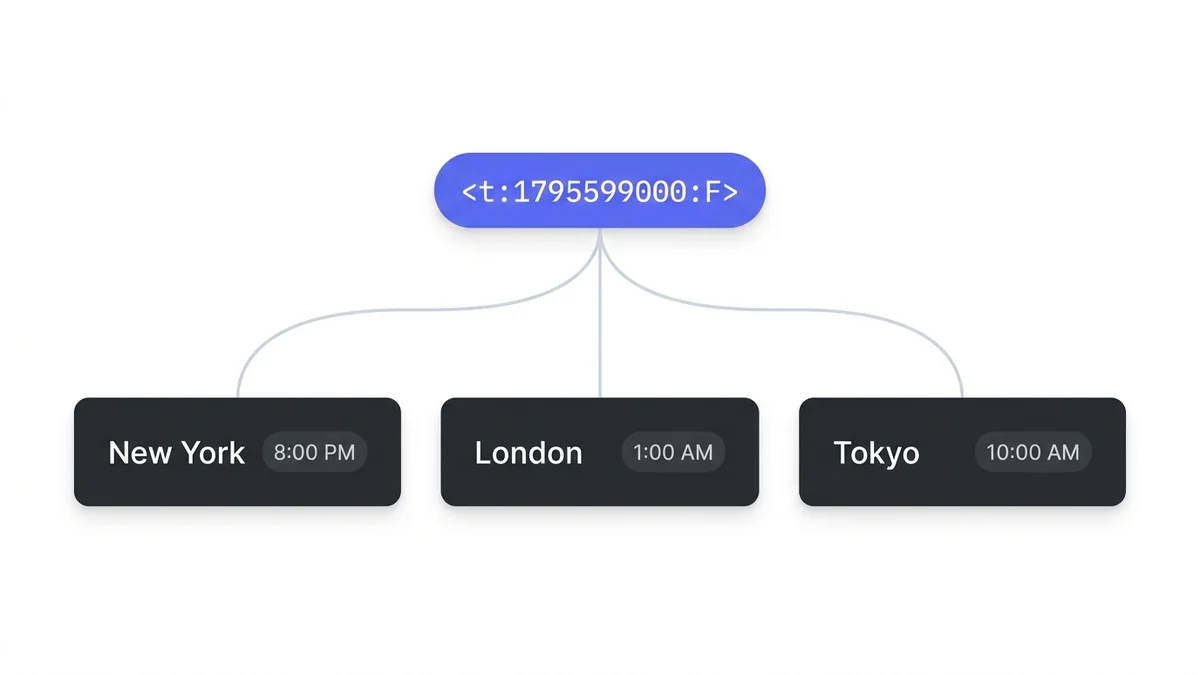
A Discord time zone converter translates a date and clock from one geographical region (such as New York EST/EDT, Los Angeles PST/PDT, London GMT/BST, Berlin CET/CEST, Tokyo JST, or Sydney AEST/AEDT) into a single universal Discord timestamp tag (<t:UNIX:F>). Once pasted into a server channel, Discord converts that single code into each member's personal local timezone, calendar weekday, and 12-hour or 24-hour clock format automatically.
Without a Discord time zone converter, international moderators end up typing long multi-zone strings like "Raid starts 8 PM EST / 5 PM PST / 1 AM GMT / 2 AM CET / 10 AM JST". Not only do those strings clutter announcements and still omit dozens of regions like India (IST), Brazil (BRT), or Australia (AEDT), they routinely break during spring and autumn Daylight Saving Time transitions when different countries move their clocks on different weekends.
How to Use the Discord Time Zone Converter
Converting any regional meeting, stream, or tournament slot takes four quick steps with zero mental UTC math.
1. Select Your Source IANA Time Zone
Open the Source Time Zone selector and choose the real geographical city where the event time is anchored, such as America/New_York, America/Los_Angeles, Europe/London, Europe/Berlin, Asia/Tokyo, or any of the 400+ official IANA zones. You can also type shortcuts like tomorrow 8pm EST or friday 19:00 CET directly into the smart quick bar.
2. Enter the Exact Regional Date and Clock Time
Pick the calendar date and local hour (down to seconds if needed) or tap one of the quick offset pills (+1h, +3h, Tonight 8PM, Tomorrow 9AM). For numeric slash dates, toggle MM/DD or DD/MM in the quick bar so US and European date formats never invert.
3. Click Through the 6-City World Strip and Viewer Simulator
Check the six live city cards right beneath the Discord chat preview: New York, Los Angeles, London, Berlin, Tokyo, and Sydney. Clicking any city switches the Preview As Viewer In dropdown immediately so you can verify whether a late North American slot crosses midnight into Saturday morning in Europe or Asia-Pacific.
4. Copy the Universal Combo Tag or Single Format
Click the top COMBO button to copy <t:UNIX:F> (<t:UNIX:R>) so every member sees their exact localized weekday, hour, and live ticking countdown side by side. Paste it directly into your Discord announcement channel, thread, or embed description.
Discord Time Zone Converter Features
Built specifically for global servers, this Discord time zone converter eliminates the blind spots found in simple browser date pickers.
Full 400+ IANA Geographical Zone Database
Instead of offering 10 fixed UTC offsets that silently drift during summer months, the Discord time zone converter loads all 400+ official IANA time zones straight from your browser, including half-hour and 45-minute zones like India (UTC+5:30), Adelaide (UTC+9:30), and Kathmandu (UTC+5:45).
Inline Daylight Saving Time Transition Detection
When you enter an ambiguous fall-back hour or a skipped spring-forward clock minute (such as 2:30 AM on US DST transition Sunday), the engine detects the edge case and displays an inline warning explaining the exact safe instant selected.
One-Click 6-City Viewer Simulation
Rather than guessing how your message reads overseas, click any tile on the 6-city comparison bar to render the dark-mode Discord message preview from that viewer's perspective, complete with 12h or 24h clock switching.
Regional Preset Pages for Repeat Scheduling
If your community always schedules in one home zone, bookmark our pre-locked converters for EST / EDT, PST / PDT, CST / CDT, UTC / GMT, CET / CEST, and JST / AEST.
Direct Share URLs for Moderator Double-Checks
Hit Share URL before pinging @everyone so a co-admin in another continent can open your pre-filled ?t=...&tz=... link and confirm the slot in two seconds.
Why Daylight Saving Time Breaks Manual Discord Time Conversions
The single biggest source of "everyone showed up an hour early" complaints in international Discord servers is the asynchronous DST gap between North America, Europe, and the Southern Hemisphere:
| Calendar Window | US / Canada Rule | UK / EU Rule | New York to London Gap |
|---|---|---|---|
| January to early March | Standard (EST = UTC-5) |
Standard (GMT = UTC+0) |
5 hours |
| Mid-March to late March (2-3 weeks) | Daylight (EDT = UTC-4) |
Still Standard (GMT = UTC+0) |
4 hours (trap window) |
| April to late October | Daylight (EDT = UTC-4) |
Summer (BST = UTC+1) |
5 hours |
| Last week of October (1 week) | Still Daylight (EDT = UTC-4) |
Back to Standard (GMT = UTC+0) |
4 hours (trap window) |
| Early November to December | Standard (EST = UTC-5) |
Standard (GMT = UTC+0) |
5 hours |
Meanwhile, Japan (JST), Singapore (SGT), and India (IST) never observe DST at all, while Australia (AEST/AEDT) and New Zealand (NZST/NZDT) spring forward in October right as the Northern Hemisphere prepares to fall back. Using a real IANA Discord time zone converter handles every single overlap automatically.
Discord Time Zone Converter Use Cases
Discord Time Zone Converter for NA + EU Gaming Raids
MMO guilds and FPS scrim teams split between US East and Central Europe rely on the Discord time zone converter to lock weekly raid starts that stay accurate right through March and October clock shifts.
Discord Time Zone Converter for Global Product Launches and Drops
SaaS teams, indie game studios, and NFT or merch communities announce exact launch minutes across 50+ countries with one universal <t:UNIX:F> (<t:UNIX:R>) line that eliminates support questions in #general.
Discord Time Zone Converter for Cross-Pacific Streams and Watch Parties
Creators with audiences split between Los Angeles, Tokyo, and Sydney use the 6-city preview strip to confirm next-day date rollovers before publishing weekend stream schedules.
Discord Time Zone Converter for International Study and Remote Work Servers
Coding bootcamps, language-exchange servers, and distributed engineering teams post office hours and standups using one universal tag instead of maintaining timezone conversion charts in pinned messages.
Discord Time Zone Converter for Multi-Stage Tournament Brackets
When an event spans check-in, group rounds, semifinals, and finals across two days, switch to the Event Schedule Builder tab to convert up to 10 consecutive time slots from your source zone in one copy.
Who Uses a Discord Time Zone Converter?
International Server Admins and Event Organizers
Admins coordinating thousands of members across North America, Europe, and APAC depend on a fast Discord time zone converter to keep announcement channels readable and mistake-free.
Esports Managers and Scrim Coordinators
Captains matching North American and European rosters use viewer simulation to spot impossible 3:00 AM local slots before confirming scrim invitations.
Streamers, VTubers, and Community Hosts
Creators broadcasting to global fanbases pair converted timestamps with Discord Bio Timezone Cards so viewers always know both the host's local clock and the next live slot.
Open-Source Maintainers and Bot Developers
Maintainers scheduling release freezes, security patches, and maintenance windows use UTC-anchored codes alongside our Discord Embed Timestamp JSON output for status channels.
Why Choose Our Discord Time Zone Converter?
Barebones generators assume you want your own browser's current timezone and force you to convert foreign dates in your head first. Other web converters wrap a single offset box in slow ads and still fail during DST transition weeks.
Our Discord time zone converter lets you pick any of 400+ source zones, test six world cities with a single click, switch 12h and 24h previews cleanly, and run 100% locally in your browser with zero ads and instant response.
Tips for Avoiding Time Zone and Date-Rollover Mistakes
- Never rely on
:talone for cross-continent events: A time-only tag like<t:UNIX:t>shows10:00 AMwithout telling a Tokyo member that it is tomorrow morning. Use:For the Combo tag<t:UNIX:F> (<t:UNIX:R>)instead. - Pick geographical IANA zones over abbreviations: Abbreviations like
CSTcan mean US Central Standard Time (UTC-6), China Standard Time (UTC+8), or Cuba Standard Time (UTC-5). ChoosingAmerica/ChicagoorAsia/Shanghairemoves every ambiguity. - Watch the
MM/DDvsDD/MMtoggle: When pasting numeric dates like06/10/2026from European teammates into the smart bar, clickDD/MMfirst so October 6 does not become June 10. - Fix broken pasted tags quickly: If someone sent you a broken or millisecond timezone tag, paste it into our Timestamp Syntax Fixer to decode and repair it automatically.
