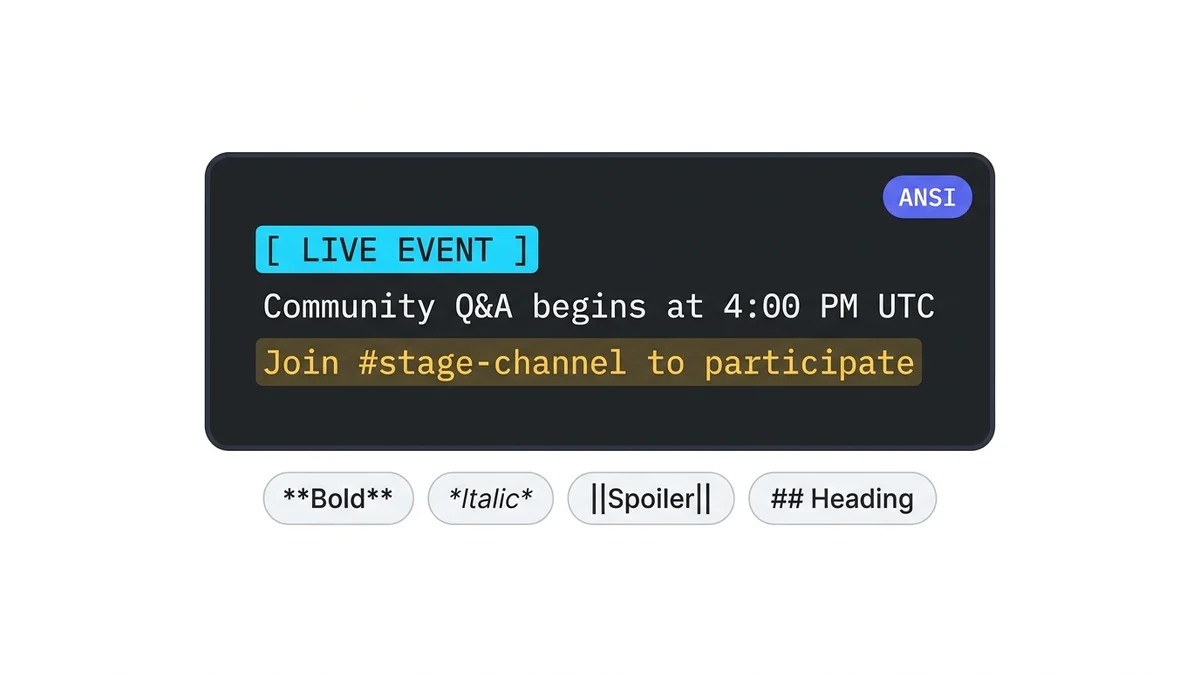
What Is Discord Text Formatting?
Discord text formatting combines standard Discord Markdown syntax (headings #, ##, ###, small muted subtext -#, bold **, italics *, underline __, strikethrough ~~, spoilers ||, block quotes >, and masked links) with ANSI 8-color code blocks (ansi) so you can turn plain chat walls into crisp, structured visual announcements without Nitro or external bots.
Typing invisible ECMA-48 Escape bytes (0x1B) by hand to make colored Discord text is nearly impossible inside a chat box. Our client-side Discord text formatting builder inserts exact escape sequences automatically, lets you combine multiple colored rows in a single banner, previews everything in Discord dark mode, and copies both ANSI blocks and Markdown wrappers in one click.
How to Use Our Discord Text Formatting Builder in 4 Steps
1. Start From a Banner Preset or Build Custom Lines
Pick Tournament Banner, Maintenance Alert, or Rules Warning to load a proven two-line structure, or click + Add Colored Line to compose up to 8 independent lines inside one visual announcement block.
2. Choose Foreground Colors, Backgrounds, Bold, or Markdown
Assign any of Discord's 8 official ANSI foreground colors, optional background highlights, and Bold toggles on each individual line. Need clean cross-platform Markdown instead of ANSI? Tap **Bold**, *Italic*, __Underline__, ~~Strike~~, ||Spoiler||, -# Subtext, or ## Heading in the toolbar.
3. Verify Contrast Inside the Dark-Mode Announcement Preview
Inspect your banner inside the dark Discord preview panel so yellow, cyan, pink, or white text reads clearly before sending it to #announcements.
4. Copy and Paste Straight Into Discord
Click Copy ANSI Colored Block to preserve every invisible ESC character cleanly, or click Copy Markdown Text for universal mobile and desktop rendering.
Discord Text Formatting Generator Features
Multi-Line Multi-Color ANSI Builder
Unlike basic single-color tools, our Discord text formatting builder lets line 1 display bold cyan on a navy highlight while line 2 displays crisp white or gold instructions inside the same ansi block.
Real Binary 0x1B Escape Insertion With Zero Broken Brackets
Many online tutorials tell users to type \u001b, which prints literal junk in Discord. This tool writes authentic ASCII Escape bytes directly to your clipboard so colors appear the instant you press Enter.
Full Support for Modern Discord Markdown (# Headings and -# Subtext)
Apply Discord's modern #, ##, ### heading hierarchy and -# muted subtext footnotes in one tap without memorizing symbol rules.
Instant Pairing With Dynamic Event Schedules and Timestamps
Combine a high-contrast colored announcement header with auto-converting <t:UNIX:F> (<t:UNIX:R>) schedules from our Event Schedule Builder right underneath.
Complete Discord Text Formatting and ANSI Code Reference
Standard Markdown Syntax Table (Desktop, Web, iOS, and Android)
| Formatting Style | Exact Syntax | Visual Effect in Discord |
|---|---|---|
| Large / Medium / Small Heading | # H1 / ## H2 / ### H3 |
Structured section titles |
| Muted Subtext (Caption) | -# Small footnote line |
Subtle gray disclaimer text |
| Bold / Italic / Bold Italic | **text** / *text* / ***text*** |
Emphasis inside paragraphs |
| Underline / Strikethrough | __text__ / ~~text~~ |
Highlights or crossed-out edits |
| Spoiler Mask | ||hidden text|| |
Tap-to-reveal hidden text |
| Block Quote / Multi-Line Quote | > line / >>> block |
Left accent bar callout |
| Masked Hyperlink | [Title](https://example.com) |
Clean inline link without raw URL |
Official Discord ANSI Escape Codes (30-37 Foreground & 40-47 Background)
| ANSI Code | Color / Role | Best Use in Announcements |
|---|---|---|
1 / 4 |
Bold / Underline | Headline emphasis inside ansi blocks |
31 |
Red | Urgent maintenance alerts and rule warnings |
32 |
Green | Server online, patch live, giveaway open |
33 |
Gold / Yellow | Important reminders and deadline notes |
34 / 36 |
Blue / Cyan | Tournament headers and info panels |
35 |
Pink / Magenta | Community events, debuts, and giveaways |
37 / 30 |
White / Gray | Body sublines and subtle metadata |
40, 41, 45 |
Navy, Orange, Indigo BG | High-contrast title badges |
Discord Text Formatting Use Cases
Discord Text Formatting for Server Rules and Welcome Panels
Admins structure #rules with ## headings, numbered bold policies, red ANSI warning banners, and -# Last updated <t:UNIX:R> footnotes so new members actually read the rules.
Discord Text Formatting for Tournament and Raid Banners
Esports captains put a bold Cyan-on-Navy ANSI tournament banner at the top of #announcements, followed immediately by a multi-line Discord Event Schedule.
Discord Text Formatting for Patch Notes and Maintenance Notices
Game and bot communities separate fixed bugs (green ANSI), known issues (gold ANSI), and downtime windows (red ANSI) so readers scan long changelogs in seconds.
Discord Text Formatting for Spoiler-Safe Watch Parties and Lore Channels
Movie and gaming servers combine ||spoiler|| masks with clear ### episode headings so fans avoid accidental plot reveals.
Who Uses a Discord Text Formatting Generator?
Server Owners and Community Moderators
Moderators building clean #welcome, #rules, #announcements, and #info channels use Discord text formatting daily to keep large servers legible.
Streamers, Esports Hosts, and Creator Teams
Hosts grab quick multi-color headers for weekly schedules, charity streams, and community contests without commissioning graphic banners.
Bot Developers and Webhook Builders
Developers test Markdown hierarchies and -# subtext formatting before embedding copy inside Discord Embed Timestamp JSON payloads.
Why Choose Our Discord Text Formatting Studio?
Most online ANSI generators only color a single line at a time, print broken \u001b text instead of real binary escape bytes, or bury copy buttons underneath heavy banner ads. This studio combines multi-line multi-color ANSI mixing, three ready-made server announcement presets, modern Markdown wrappers (## headings and -# subtext), live dark-mode contrast preview, and direct links to all 9 dynamic timestamp tools in one zero-ad workspace.
Critical Tips for Clean Discord Text Formatting
- Never put
<t:UNIX:F>inside anansicode block: Code blocks intentionally disable dynamic timestamp rendering. Put your colored ANSI banner on lines 1-4, close the triple backticks, and put your dynamic timestamps on line 5 right below. - Design for mobile fallbacks: Because some mobile Discord versions render
ansifences as plain gray code, keep critical dates and links outside the ANSI block using regular##Markdown headings and Discord Timestamps. - Suppress link previews cleanly: Wrap URLs inside angle brackets (
[Docs](<https://discordtimestamp.im/tools>)) whenever you do not want a bulky preview card crowding your announcement.
