What Is a Discord Snowflake?
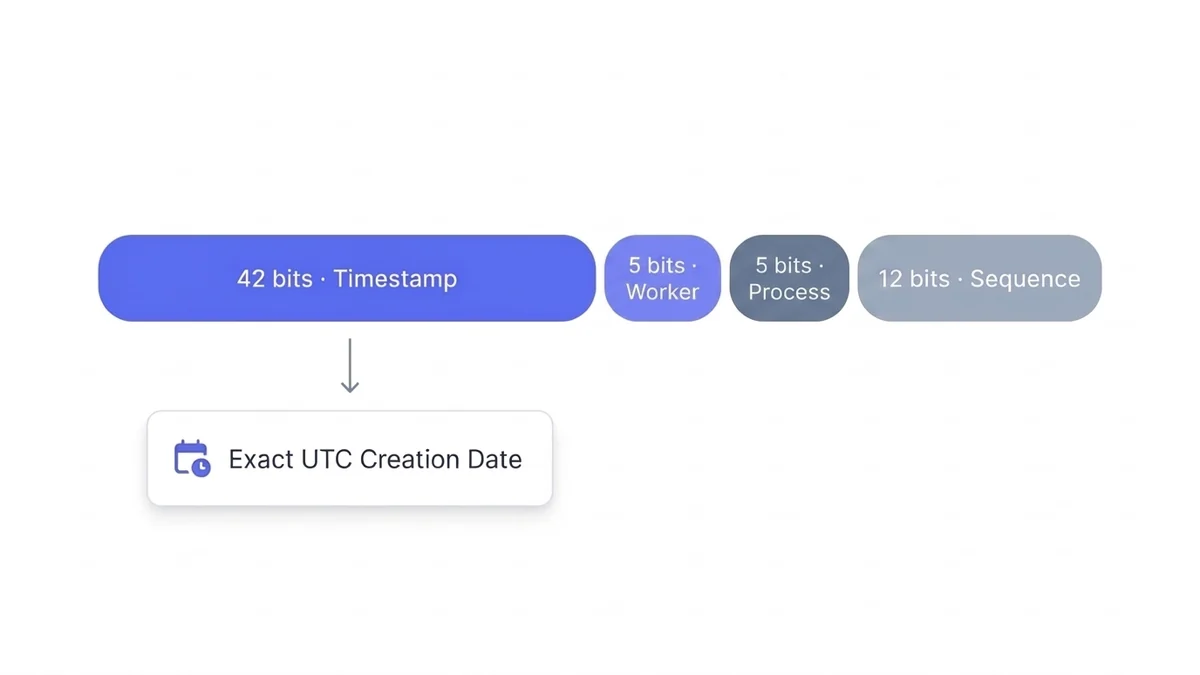
A Discord Snowflake is a globally unique 64-bit unsigned integer (usually 17 to 20 digits long, such as 175928847299117063) assigned to every object ever created on Discord: user accounts, messages, channels, forum threads, custom emojis, webhooks, roles, and servers. Modeled on Twitter's distributed Snowflake specification, a Discord Snowflake packs four distinct fields into one sortable number, starting with a 42-bit millisecond creation timestamp in its highest bits.
Because that creation time is encoded mathematically inside the ID itself, you can decode the exact millisecond an account was registered, a message was posted, or a server was founded using pure client-side bit-shifting. No Discord Bot Token, no OAuth login, and no external API request are ever needed.
How to Decode a Discord Snowflake ID in 4 Steps
Extract exact UTC milliseconds, local dates, and <t:...> tags from any Discord Snowflake in seconds.
1. Turn On Developer Mode in Discord
Open Discord User Settings -> Advanced on desktop or web (on iOS and Android: App Settings -> Behavior) and switch Developer Mode ON. This unlocks the native Copy ID context menu option across Discord.
2. Copy Any User, Message, Channel, Role, or Server ID
Right-click (or long-press on mobile) any user profile, chat message, text channel, custom emoji, or server icon and tap Copy ID. You will receive a 17-digit to 20-digit integer on your clipboard.
3. Paste the Discord Snowflake Into the Decoder Box
Drop the numeric ID (or a whole block of moderation text containing multiple IDs) into the textarea above. The Discord Snowflake decoder immediately unpacks UTC ISO 8601 time with milliseconds, your local browser time, 10-digit Unix seconds, relative age, Worker ID, Process ID, and Increment.
4. Copy the Decoded Timestamp or <t:...> Tag
Copy the exact UTC timestamp for audit logs or copy the ready-made <t:UNIX:F> and <t:UNIX:R> tags to share the creation date cleanly inside Discord channels.
Discord Snowflake Decoder Features
Our Discord Snowflake decoder goes beyond simple date extraction to serve both server moderators and backend bot engineers.
Exact BigInt 64-Bit Precision Without Rounding Errors
Standard JavaScript Number values lose precision above 9007199254740991 (16 digits), which silently corrupts the low bits of 18-digit and 19-digit IDs. This decoder processes every Discord Snowflake with native BigInt bitwise arithmetic so millisecond, worker, process, and sequence bits stay 100% intact.
Full 4-Field Binary Bit Breakdown
Every decoded result displays all four official Discord Snowflake components: 42-bit timestamp since 2015-01-01T00:00:00.000Z, 5-bit Internal Worker ID, 5-bit Internal Process ID, and 12-bit Increment counter.
Multi-ID and Mixed Message Extraction
Paste an entire moderation log containing several User IDs, Message IDs, and broken <t:...> tags at once. The panel automatically detects every Discord Snowflake ID and displays an organized breakdown card for each one.
Instant Conversion Into All 9 Discord Timestamp Tags
Paste any Discord Snowflake into the smart quick bar at the top of the studio to load its exact creation second across all nine official <t:UNIX:FORMAT> tags and our 6-city global comparison strip.
100% Local Privacy With Zero API Tracking
Every bit-shift executes inside your own browser memory. None of the Discord User IDs, Server IDs, or moderation logs you inspect are ever transmitted to a remote server.
Inside the 64-Bit Discord Snowflake Binary Structure
Every Discord Snowflake follows a fixed 64-bit layout anchored to the Discord Epoch (1420070400000 ms = January 1, 2015 00:00:00 UTC):
| Bit Range | Width | Field Name | Value Range | Exact BigInt Extraction Formula |
|---|---|---|---|---|
| Bits 63-22 | 42 bits | Milliseconds since Discord Epoch | 0 to 4.39e12 (~139 yrs) |
(BigInt(id) >> 22n) + 1420070400000n |
| Bits 21-17 | 5 bits | Internal Worker ID | 0 to 31 |
(BigInt(id) & 0x3E0000n) >> 17n |
| Bits 16-12 | 5 bits | Internal Process ID | 0 to 31 |
(BigInt(id) & 0x1F000n) >> 12n |
| Bits 11-0 | 12 bits | Per-Process Increment | 0 to 4095 |
BigInt(id) & 0xFFFn |
Because the 42-bit timestamp covers 2^42 milliseconds (approximately 139.4 years from 2015), Discord's Snowflake format remains valid until the year 2154 without overflowing.
Discord Snowflake Use Cases
Discord Snowflake for Silent Alt and Raid Account Checks
Moderators vetting suspicious joiners paste a User's Discord Snowflake privately to check whether the account was created three minutes ago during a raid wave or years ago, without exposing public lookup bot logs in #general.
Discord Snowflake for Moderation Incident Timelines
When documenting scam reports or rule violations, staff decode Message IDs into exact millisecond UTC timestamps and copy <t:UNIX:F> chips into private audit channels.
Discord Snowflake for Server Founding Anniversaries
Server owners decode their own Server ID to reveal the exact launch date and second of their community, then turn it into a dynamic Relative Time or Birthday Countdown anniversary notice.
Discord Snowflake for Bot Pagination and Chronological Queries
Developers interacting with Discord REST endpoints (before, after, around message pagination) synthesize or inspect Discord Snowflake boundaries to fetch messages from exact historical windows.
Discord Snowflake for Emoji, Role, and Channel Audits
Admins cleaning up old servers decode Channel IDs or Role IDs to identify legacy assets created years earlier before archiving them.
Who Uses a Discord Snowflake Decoder?
Community Moderators and Trust-and-Safety Teams
Moderation staff use a private local Discord Snowflake decoder daily to verify account ages, document message timestamps, and build exact incident logs.
Bot Developers and Discord API Engineers
Engineers writing Discord.js, Discord.py, or Go bots inspect worker/process shards and test Snowflake-to-Unix math before shipping code from our Developer Code Snippets page.
Server Owners and Event Organizers
Community founders check their exact server creation date to celebrate annual community milestones with live countdown tags.
Everyday Discord Users
Curious members decode their own User ID or first message ID to see the exact second they joined Discord down to the millisecond.
Why Choose Our Discord Snowflake Decoder?
Many legacy lookup sites either ask for risky bot tokens, throttle requests through server backends, or stop at a bare date string with no copyable Discord tags. Our Discord Snowflake decoder runs instantaneously in browser BigInt, exposes every internal bit field, handles multiple IDs in one paste, and turns any decoded ID into all nine <t:...> formats in one click.
Tips for Working Safely With Discord Snowflakes
- Always store Discord IDs as strings in JSON: Passing numeric Snowflakes directly through
JSON.parse()in JavaScript truncates digits beyond 16 characters. Keep IDs quoted as strings ("175928847299117063") and convert withBigInt(id). - Remember the 17-digit minimum: Early 2015 Discord accounts often have 17-digit IDs, 2016-2022 IDs are typically 18 digits, and newer IDs from 2022 onward are 19 digits. All three decode identically with the same bit-shift formula.
- Convert milliseconds to seconds before
<t:...>: The Snowflake bit-shift yields 13-digit milliseconds; divide by1000before wrapping into<t:UNIX:F>(or verify in our Unix Converter).
