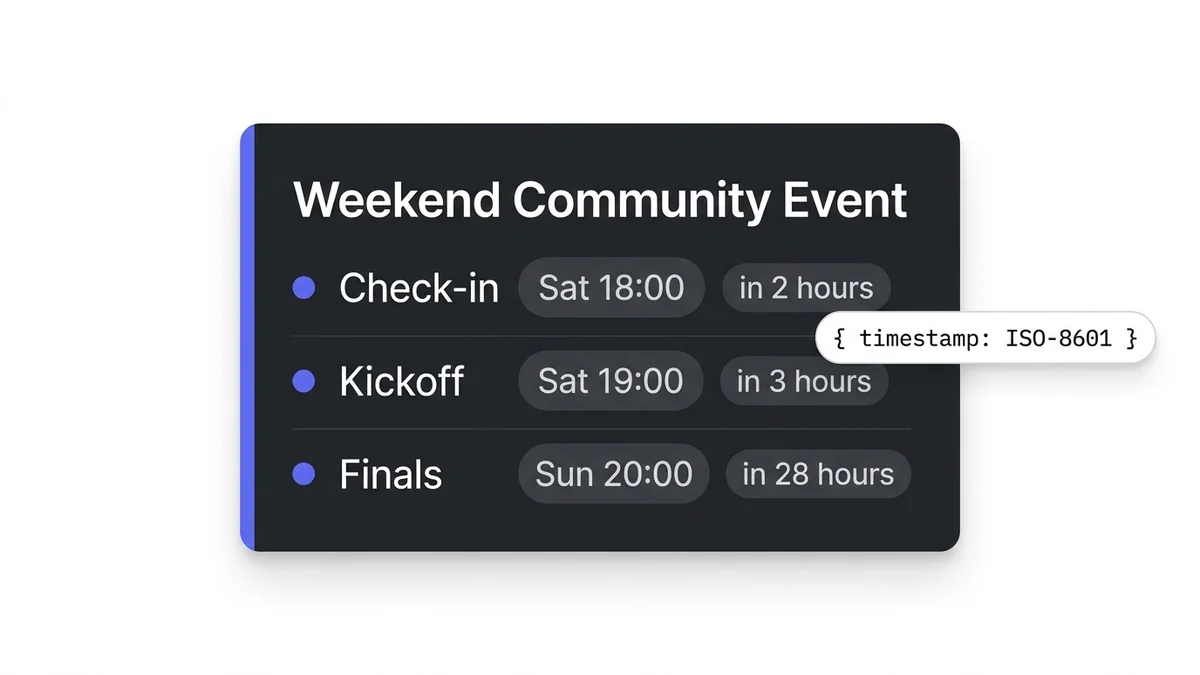
What Is a Discord Embed Timestamp?
A Discord embed timestamp comes in two distinct formats depending on where inside a Discord embed card you place it. That split design trips up thousands of bot builders and Discohook/Zapier users every week:
- The Embed Footer Clock (
embed.timestamp) requires a strict ISO 8601 UTC string (such as2026-11-25T12:00:00.000Z). Discord localizes this automatically beside your footer text, and it rejects Unix integers or<t:...>tags with anHTTP 400 Bad Requesterror. - Dynamic Body Tags (
descriptionandfields[].value) accept standard 10-digit Unix Markdown tags (<t:1795579200:F>and<t:1795579200:R>), giving you live ticking countdowns and custom styles inside the main card body.
Our Discord embed timestamp generator produces both simultaneously from one date, time, and DST-safe IANA timezone so you never fight mismatched formats or malformed webhook JSON again.
How to Generate a Discord Embed Timestamp in 4 Steps
Build, preview, and copy a production-valid Discord embed timestamp payload in seconds.
1. Set Your Embed Date, Time, and Source IANA Time Zone
Use the dedicated Embed Date, Embed Time, and Time Zone selectors right inside the Embed JSON panel above, or type a natural phrase like tomorrow 8pm EST in the smart quick bar. You do not need to switch tabs to adjust the schedule.
2. Customize Title, Description, Accent Color, and Footer Label
Fill in your embed title, description copy, footer text, and sidebar stripe color. The builder expands format tokens into live <t:UNIX:F> and <t:UNIX:R> tags inside the JSON description while automatically translating your hex color (#5865f2) into Discord's required base-10 decimal integer (5793266).
3. Inspect the Live Dark-Mode Embed Preview Card
Verify your colored left border, formatted headline, dynamic timestamp chips, and localized footer clock inside the live Discord embed card mockup before shipping.
4. Copy the ISO 8601 String or Complete Webhook JSON
Click Copy ISO if you only need the 2026-11-25T12:00:00.000Z footer value for Discord.js or Discord.py, or click Copy Webhook JSON to paste the entire valid payload straight into Discohook, Zapier, Make, n8n, or a curl script.
Discord Embed Timestamp Generator Features
Dual ISO 8601 + Dynamic <t:...> Output in One Click
Eliminate manual date math by generating the exact UTC ISO 8601 footer value and synchronized 10-digit Unix description tags from the exact same instant.
Self-Contained Date, Time, and 400+ IANA Zone Controls
Adjust regional schedules (EST, PST, GMT, CET, JST, AEST, or any of 400+ IANA zones) directly inside the Embed tab with automatic Daylight Saving Time precision.
Automatic Hex-to-Decimal Color Conversion
Discord Webhooks reject "color": "#5865f2" with a 400 validation error. Pick any visual color swatch and get the exact decimal color integer inserted automatically into your JSON.
Strict Webhook JSON Validation Ready for Automations
Every quote, brace, trailing Z, and array wrapper is formatted cleanly for immediate pasting into Discohook, Zapier Webhooks, Make.com, n8n, and GitHub Actions.
Instant Companion Reference for Bot Developers
Need native builder code instead of raw JSON? Grab copy-ready Discord.js v14, Discord.py 2.x, and Go helpers from our Discord Epoch Code Snippets guide.
Complete Discord Embed Field Compatibility Matrix
Before wiring a webhook or bot command, check exactly which embed fields parse dynamic <t:...> tags and which require plain text or ISO 8601:
| Embed JSON Field | Parses <t:UNIX:FORMAT>? |
Required Input Type | Notes |
|---|---|---|---|
embeds[].description |
Yes | Markdown + <t:...> |
Up to 4,096 chars; supports all 9 formats |
embeds[].fields[].value |
Yes | Markdown + <t:...> |
Up to 1,024 chars per field value |
embeds[].timestamp |
No | Strict ISO 8601 UTC |
Must include Z or offset; renders beside footer |
embeds[].title |
No | Plain text only | <t:...> renders as literal raw text |
embeds[].fields[].name |
No | Plain text only | Keep headings plain; put tags in value |
embeds[].footer.text |
No | Plain text only | Pair with embeds[].timestamp for footer clock |
embeds[].author.name |
No | Plain text only | Does not parse Markdown timestamps |
Quick Webhook Test Command (curl)
Once you copy the JSON from the Discord embed timestamp generator above, test it against a private channel webhook in one command:
curl -X POST "$DISCORD_WEBHOOK_URL" \
  -H "Content-Type: application/json" \
  -d '{"embeds":[{"title":"Server Maintenance Window","description":"Downtime begins <t:1795579200:F> (<t:1795579200:R>).","color":5793266,"footer":{"text":"Status Notice"},"timestamp":"2026-11-25T12:00:00.000Z"}]}'
Discord Embed Timestamp Use Cases
Discord Embed Timestamp for Server Maintenance and Status Alerts
DevOps and game server admins combine an ISO 8601 alert footer with a live <t:UNIX:R> recovery countdown inside description text so players see remaining downtime at a glance.
Discord Embed Timestamp for Discohook Welcome and Rules Cards
Server owners designing rich branded panels in Discohook put Last updated <t:UNIX:R> in the description and an exact ISO 8601 revision timestamp in the footer.
Discord Embed Timestamp for GitHub Actions, Stripe, and CI/CD Alerts
Engineering teams fire automated deployment or release notifications carrying both UTC build metadata and clickable localized timestamps for global teammates.
Discord Embed Timestamp for Tournament and Event Announcements
Moderators combine a multi-line Discord Event Schedule inside an embed description with an accent sidebar color and clean footer timestamp.
Discord Embed Timestamp for Moderation Audit Logs
Custom moderation bots log warnings, bans, and message deletions with an ISO 8601 event footer plus exact <t:UNIX:S> second-precision timestamps decoded from Discord Snowflake IDs.
Who Uses a Discord Embed Timestamp Generator?
Bot Developers (Discord.js, Discord.py, Eris, DiscordGo)
Programmers test embed layouts, color integers, and ISO 8601 string formatting quickly before deploying slash commands or webhook emitters.
Server Admins Using Discohook and Webhook Panels
Non-coders building polished announcements, reaction-role panels, and server rules copy valid JSON directly into Discohook with zero syntax headaches.
No-Code Automation Builders (Zapier, Make, n8n, IFTTT)
Workflow creators verify exact Discord Webhook JSON syntax before connecting calendar, RSS, or e-commerce triggers to Discord channels.
DevOps and Game Hosting Teams
Infrastructure engineers generate copy-ready maintenance alert embeds with accurate DST-safe UTC conversion.
Why Choose Our Discord Embed Timestamp Builder?
General JSON formatters do not preview Discord's embed border or explain why <t:...> breaks inside titles and footers. General timestamp sites give you Unix seconds without building valid ISO 8601 webhook JSON. Our Discord embed timestamp studio unites IANA timezones, live embed card preview, decimal color conversion, ISO 8601 output, and <t:...> expansion in one ad-free tool.
Tips for Avoiding HTTP 400 Webhook Errors
- Always include
Zor+00:00onembed.timestamp: Omitting the timezone designator in ISO 8601 strings can trigger validation errors or silent local-offset drift. - Never send
#hexstrings inembed.color: Convert#5865f2to5793266(or let our color picker calculate it automatically). - Keep total embed characters under 6,000: Discord counts title, description, field names, field values, author, and footer together across every embed in a single message.
- Debug broken description tags fast: If a
<t:...>chip inside your embed description renders as raw code, drop it into our Timestamp Syntax Fixer to spot stray backticks or 13-digit milliseconds.
