What Is HammerTime Discord and Why Look for an Alternative?
If you run a global Discord server, you have probably used HammerTime Discord (hammertime.cyou) or the classic r.3v.fi/discord-timestamps/ page. HammerTime Discord earned real trust because it is free, shows no ads, supports all 9 Discord formats, and covers many UI languages.
Still, real r/discordapp posts point out daily friction in both tools. Clicking separate date, hour, minute, and timezone boxes is slow during live chat. Neither tool previews a real Discord message across six global cities. Neither tool builds About Me Bio cards, 10-line event schedules, Webhook JSON, or broken-tag fixes.
How to Switch From HammerTime Discord in 4 Fast Steps
Because every <t:UNIX:FORMAT> tag follows Discord's exact official syntax, switching from HammerTime Discord requires zero relearning.
1. Type Natural Phrases Into the Quick Bar
Instead of adjusting separate date and minute boxes, type tomorrow 8pm EST, in 2h 30m, or 25/11 20:00 CET straight into the top smart input bar on our Discord Timestamp Generator.
2. Click Through the 6-City Viewer Strip
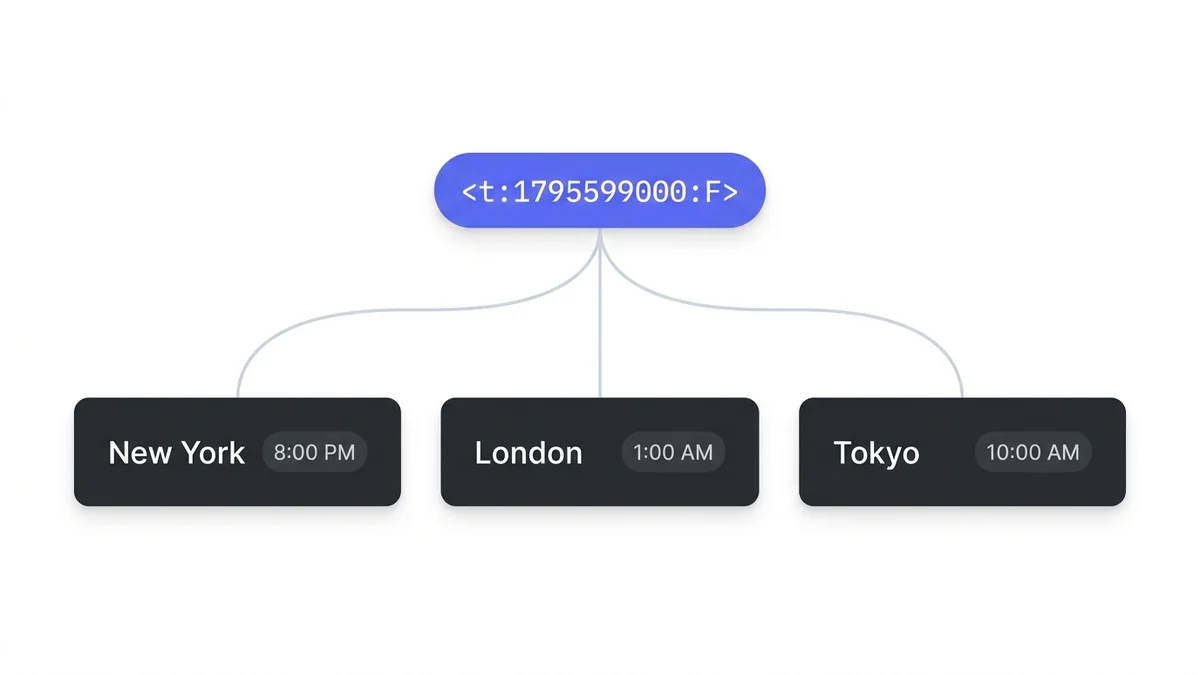
Inspect how your message lands in New York, Los Angeles, London, Berlin, Tokyo, and Sydney directly inside the dark Discord chat bubble preview before posting to an international server.
3. Copy the One-Click Combo Tag or Any of All 9 Formats
Grab <t:UNIX:F> (<t:UNIX:R>) in a single click from the top COMBO row (instead of copying :F and :R separately), or click any of the nine official formats including compact :s and :S.
4. Use Built-In Tabs for Bios, Schedules, Snowflakes, and Webhooks
When your task goes beyond a single timestamp, switch tabs inside the exact same page for Bio Timezone Cards, Event Schedules, Snowflake Decoding, or Embed JSON.
Comparison Matrix: r.3v.fi vs. HammerTime Discord vs. discordtimestamp.im
| Feature | r.3v.fi |
HammerTime Discord (hammertime.cyou) |
discordtimestamp.im |
|---|---|---|---|
All 9 Official Formats (incl. :s and :S) |
7 formats only | Yes (all 9) | Yes (all 9 + 1-click Combo tag) |
Natural Language Input (tomorrow 8pm EST, in 3h) |
No | No | Yes (plus MM/DD / DD/MM switch) |
Dedicated Relative Duration Builder (2h 30m) |
No | Offset controls | Dedicated In / Ago d/h/m bar |
| Live Dark-Mode Discord Chat Preview | No | No | Yes (with Viewer Timezone simulator) |
| Clickable 6-City Global Strip | No | No | Yes (NY, LA, London, Berlin, Tokyo, Sydney) |
| 400+ DST-Safe IANA Zones + DST Gap Warning | Local browser only | Yes | Yes + inline DST transition alerts |
| Discord Bio Timezone Card + 190-Char Meter | No | No | Yes (5 editable templates + 12h/24h) |
| Multi-Line Event Schedule Builder (10 rows) | No | No | Yes (4 line formats, 1-click copy) |
| Snowflake ID Decoder & 7-in-1 Syntax Fixer | No | No | Yes (BigInt ms + instant repair) |
| Webhook Embed ISO 8601 JSON Builder | No | No | Yes (ISO footer + <t:...> body) |
| Recent Copied History & Shareable URLs | No | Shareable URL | Yes (?t=...&tz=... + last 5 epochs) |
| Zero Ads & 100% Client-Side Privacy | Yes (uses alert()) |
Yes | Yes (non-blocking green toast) |
Features Built to Remove Daily Friction From HammerTime Discord Workflows
Sub-Second Single-Input Natural Language Parsing
Type next fri 9pm CET or in 45m in two seconds and get every official tag immediately without clicking multiple form fields.
Interactive 6-City Cross-Timezone Verification
Never guess whether an evening North American raid pushes into Saturday morning in London, Berlin, or Sydney. Click any city tile to preview the exact message bubble that reader sees.
All Five Server Time Workflows Under One Ad-Free Roof
Stop keeping five different tabs open for timestamps, About Me bios, tournament schedules, Snowflake ID checks, and Discohook Webhook JSON.
Automatic 7-in-1 Broken Tag Repairer
Whenever a teammate or bot drops a broken 13-digit millisecond tag or lowercase :r countdown, repair the entire paragraph cleanly on our Fix Discord Timestamp Not Working page.
Use Cases Where Moderators Prefer Our HammerTime Discord Alternative
Fast-Moving Community Chat Responses
Answering "when does maintenance end?" in #general takes three seconds when you type in 90m and copy the Combo tag with zero modal popups.
Multi-Stage Tournament and Stream Announcements
Building six or eight timestamps individually in HammerTime Discord takes repetitive copy-paste cycles; our Event Schedule Builder outputs all stages in one pass.
Setting Up International About Me Bios
Creating "12:00 PM for me is <t:UNIX:t> for you!" or an Online Hours bio card with live 190-character validation is built straight into the second tab.
Debugging Bot Webhooks and Auditing Snowflake IDs
Developers generate strict ISO 8601 embed JSON and inspect 18-digit Snowflake creation milliseconds without leaving the site.
Who Uses a HammerTime Discord Alternative?
Veteran Server Moderators and Community Admins
Long-time HammerTime Discord power users who want fewer clicks, instant Combo tags, and built-in multi-line event schedules switch smoothly in seconds.
Mobile-First Discord Hosts
Admins working from iOS or Android appreciate our 390px single-column ergonomics, Home Screen PWA support, and non-blocking copy confirmation.
Bot Developers and Content Creators
Engineers and streamers use our integrated Embed JSON, ANSI text formatter, and 6-city preview tools alongside classic <t:...> generation.
Why Choose discordtimestamp.im Over Legacy Generators?
We respect what HammerTime Discord and r.3v.fi built for the Discord community, and if you need an interface translated into 25+ UI languages today, HammerTime Discord remains a strong option. For English-speaking admins, gamers, creators, and developers who want natural language typing, instant Combo tags, 6-city simulation, Bio cards, multi-line schedules, Webhook JSON, and syntax repair in one zero-ad workspace, discordtimestamp.im cuts daily workflow time in half.
Quick Tips When Transitioning Your Bookmarks
- Pin your favorite shortcut directly: Bookmark /est-to-discord-timestamp, /pst-to-discord-timestamp, /cet-to-discord-timestamp, or /countdown to skip timezone selection completely.
- Check native desktop options too: Compare web tools with Discord's built-in picker in our Discord @time vs Web Generator guide.
